Loli-Dolly Holidays: Festive Dingbats for Creative Projects
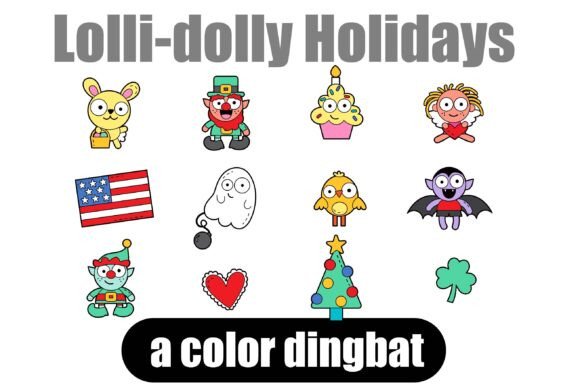
Looking for a way to elevate your projects instantly? Say hello to the Loli-Dolly Holidays Dingbat Font, featuring 26 holiday-influenced characters. Dingbat fonts are a designer's secret weapon that brings flair, fun, and functionality to any creative work. Dingbats are more than just symbols — they’re ready-to-use mini graphics that can save you time, simplify your process, and make your visuals pop.
Understanding Dingbat Fonts and Their Creative Power
A dingbat font isn't your typical serif font or sans serif font designed for body text. Instead, each letter key on your keyboard activates a unique glyph or illustration. The Loli-Dolly Holidays typeface transforms standard keystrokes into charming, festive artwork. Think of it as a library of scalable vector art that lives right inside your text editing software. Because the graphics are delivered as font characters, they scale infinitely without losing quality, making them perfect for everything from small icons on a web page to massive prints on a tote bag.
The visual style of Loli-Dolly Holidays leans into a playful, illustrative aesthetic. It captures the warmth and whimsy of the holiday season without relying on cliché stock imagery. The characters possess a hand-drawn quality that feels personal and approachable, bridging the gap between professional design assets and heartfelt, homemade charm. This specific creative font offers a distinct personality that resonates well with audiences looking for authenticity in brand identity and visual communication.
Practical Applications: Where Loli-Dolly Holidays Shines
The versatility of a premium font like this extends far beyond simple holiday greeting cards. For small business owners and entrepreneurs, these dingbats serve as quick design solutions for seasonal marketing campaigns. Imagine you are launching a holiday sale. Instead of spending hours searching for a graphic designer to create a snowflake or a gift box icon, you simply type the corresponding letter using Loli-Dolly Holidays. You can instantly place these graphics on social media graphics, website banners, or email headers.
Publishers and bloggers will find this typeface particularly useful for editorial design. It works exceptionally well for breaking up long blocks of text, creating unique bullet points, or adding decorative separators between sections. When used in packaging design, these characters can wrap around a product box or adorn a label, offering a cohesive look that ties the product directly to a seasonal theme. Crafters and hobbyists can utilize the font for physical goods, such as custom t-shirts, mugs, or scrapbooking layouts, thanks to its compatibility with standard cutting machines.
Integrating Dingbats into Your Visual Hierarchy
Effective modern typography is about more than just choosing a display font that looks pretty; it is about guiding the viewer's eye. Loli-Dolly Holidays can significantly influence visual hierarchy. By using a dingbat character as a large header element or a focal point, you immediately signal the theme of the content to the reader. This creates an instant connection and improves audience engagement because the visual language is clear and inviting.
However, readability remains a priority. While these characters are visually striking, they should be used as accents rather than for long-form text. A common mistake in web design and print is overusing decorative elements. The best approach is to pair Loli-Dolly Holidays with a clean, legible font. For example, a neutral sans serif font for your body text provides a modern, clean canvas that allows the festive dingbats to stand out without causing visual clutter.
Strategic Selection: Pairing and Licensing
When evaluating a commercial font, you must consider how it fits into your existing toolkit. Font pairing is an essential skill. Since Loli-Dolly Holidays has a distinct, illustrative personality, it pairs best with typefaces that are understated. A geometric sans serif or a simple serif font can balance the whimsy of the dingbats. If you try to pair it with a complex script font or a busy handwritten font, the result might look chaotic rather than curated.
Before finalizing your design, take the time to test the font in context. Place the characters next to your brand colors and existing typography to ensure they complement rather than clash. Check the weight and balance of the icons against your text size. Does the icon overpower the text, or does it support it? These small details separate amateur designs from professional logo design and marketing materials.
Finally, always review the licensing. Most premium fonts come with specific terms regarding commercial use. Whether you are a freelance designer creating assets for a client or a business owner using the font for your own products, understanding the license ensures you remain compliant. Loli-Dolly Holidays offers a robust set of 26 characters, providing enough variety for a full campaign without needing to supplement with other graphics. By treating these dingbats as essential design assets, you streamline your workflow and maintain a consistent, professional brand identity throughout the holiday season.